Connect your Kindle
You need two addresses to receive articles: your Kindle's delivery address and your personal KTool sender address. You can find both in Send-to-Kindle settings.
Find your Kindle email address
- Sign in to the Amazon account that your Kindle is registered to.
- Open Manage Your Content and Devices, then Preferences and Personal Document Settings.
- Under Send-to-Kindle Email Settings, find the address for the device or Kindle app you want to use.
- Open KTool's Send-to-Kindle settings, choose your device type, and enter the address. If the form shows the domain separately, enter only the part before the
@. - Check the complete Send to address shown below the form and save your changes.
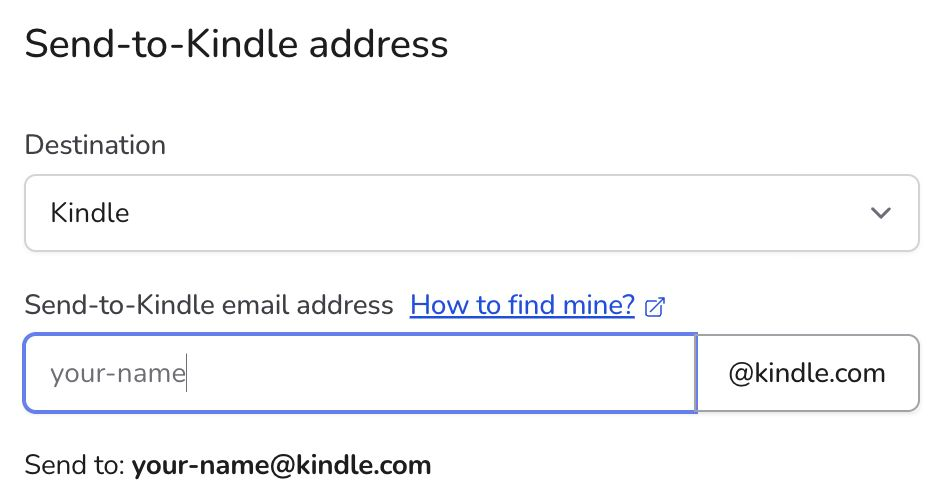
Use the Amazon site for your account's region if your devices do not appear. Your Kindle address is different from the email you use to sign in to Amazon or KTool.
Approve your KTool sender
- In KTool's Send-to-Kindle settings, copy the full address under Send-from address. It looks like
your-username@ktool.io. - Return to Amazon's Personal Document Settings.
- Under Approved Personal Document Email List, choose Add a new approved e-mail address.
- Paste your full KTool sender address and save it.
Approve the exact address displayed in your account. The old domain-only entry @ktool.io is not sufficient. Your newsletter inbox, which ends in @inbox.ktool.io, is a separate address and is not the sender to approve here.
See Amazon's approved-sender instructions for help finding this setting.
Import settings with the browser extension
If you have the desktop browser extension, open Amazon's Devices page, then open the KTool extension and choose Import configurations. Check the imported destination in KTool afterward, and make sure your full personal sender address is approved in Amazon.
Send a test article
Install the browser extension, open an article, and choose Send to Kindle from the extension. This is the recommended way to send individual articles, including ones you can read behind a paywall or sign-in. Connect your Kindle to Wi-Fi and sync its library. Delivery also depends on Amazon processing the document; a successful send does not mean it is already downloaded on the device.
If it does not appear, follow the delivery checklist.